
How to manage security using Touch Memory keys
In addition to mobile app control, the system supports local management using Touch Memory (TM) keys — a convenient option when:
-
The internet connection is temporarily unavailable
-
Your phone is out of battery
-
You want to grant access to others without using the app
With TM keys, you can:
-
Arm and disarm the object
-
Control outputs on the controller (e.g., open a lock or turn on lights)
You can register up to 25 keys and assign individual functions to each.
|
How to connect a Touch Memory reader
Before adding a key, make sure the TM reader is properly connected to the controller.
To connect the reader:
1. Locate the 1-Wire terminal on the hub’s controller
2. Connect the TM reader to the 1-Wire terminal (this same terminal is used for temperature sensors)
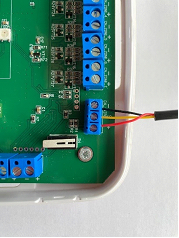
Connecting the Touch Memory reader to the controller
How to add a key
To register a new Touch Memory key:
1. Open the mobile app and go to Object settings → Access keys
2. Tap the plus icon  in the top right corner
in the top right corner3. Follow the on-screen instructions — hold the key to the reader and start the search

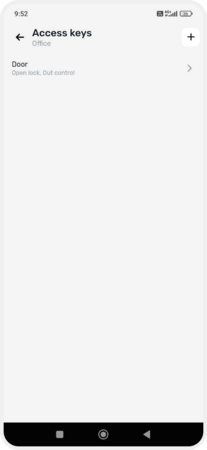


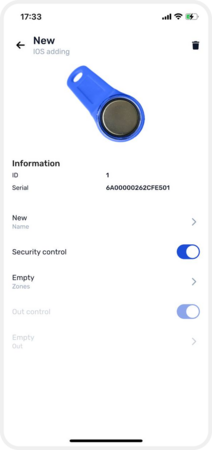
Adding a key in the application
Once the key has been read, you can change its name and assign it a control function:
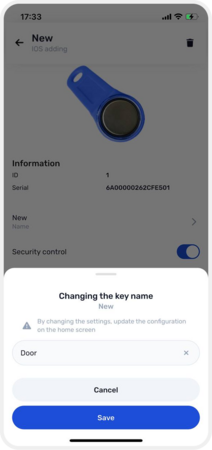
-
Security control — choose the zone this key will arm/disarm

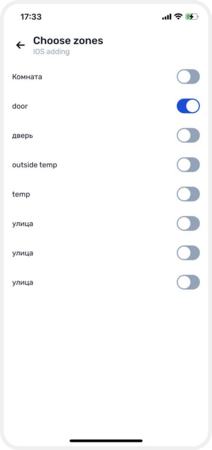
-
Output control — choose which output (e.g., a lock or lighting circuit) the key will manage

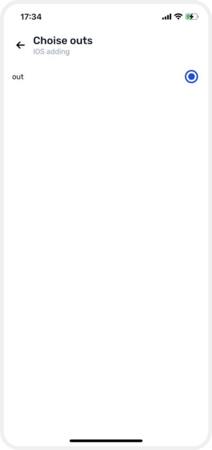
A single key can control both a section and an output, depending on how you configure it.
If you scan a key that has already been registered, the system will display a Duplicate key found message. In that case, tap Search again and present a different, unregistered key.
How to view all registered keys
To see a list of all registered TM keys go to Access keys on the object’s main screen.
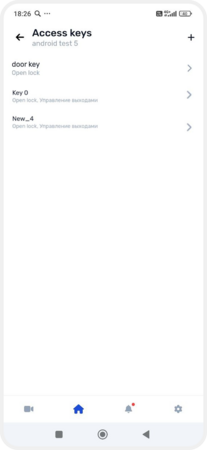
List of keys
How to delete a key
To remove a key you no longer need:
1. Go to Access keys from the object’s main screen
2. Select the key you want to remove
3. Tap the delete icon  in the top right corner and confirm the deletion
in the top right corner and confirm the deletion 
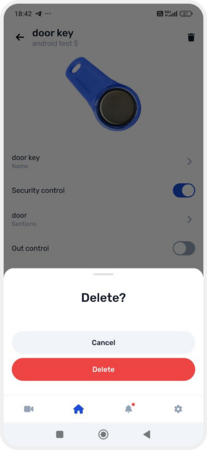
Deleting a key